The In-Toorak-Tive Garden
The In-Toorak-Tive Garden
[UX/UI Design]
[UX/UI Design]
[Digital Placemaking] [2024]
[Digital Placemaking] [2024]
Challenge
Challenge
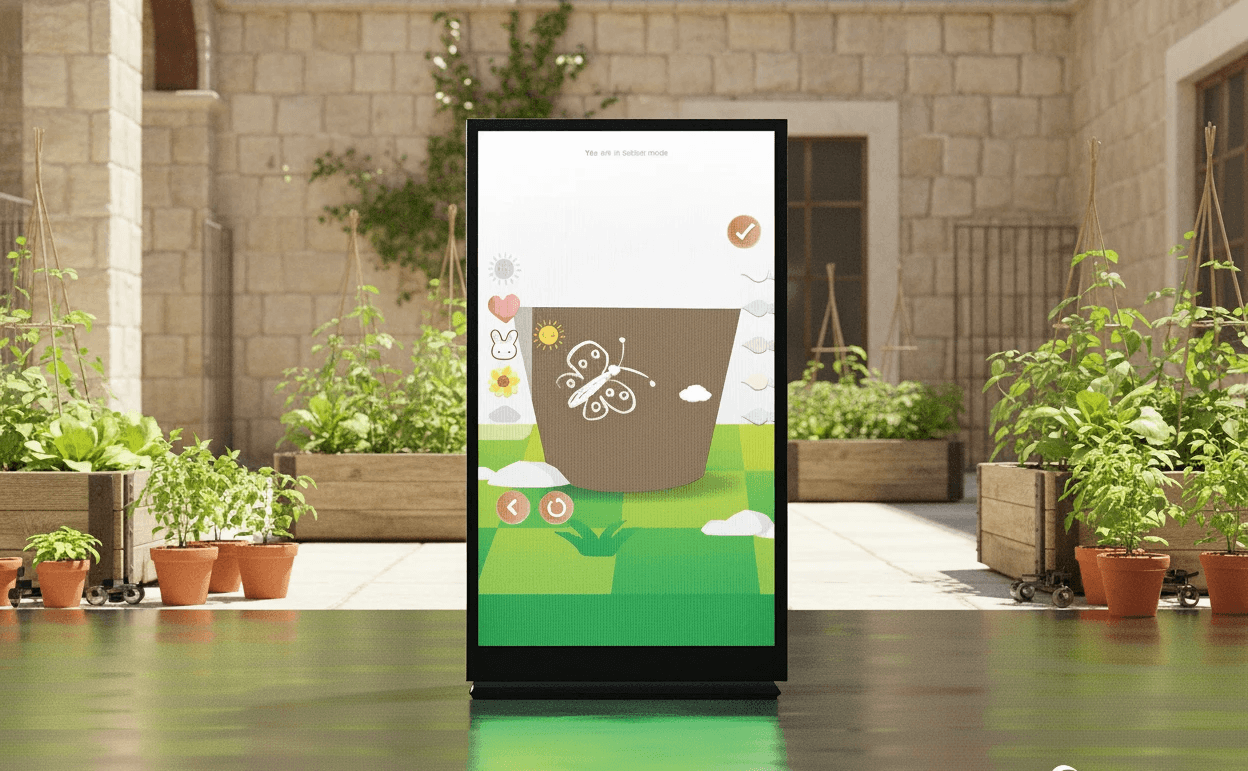
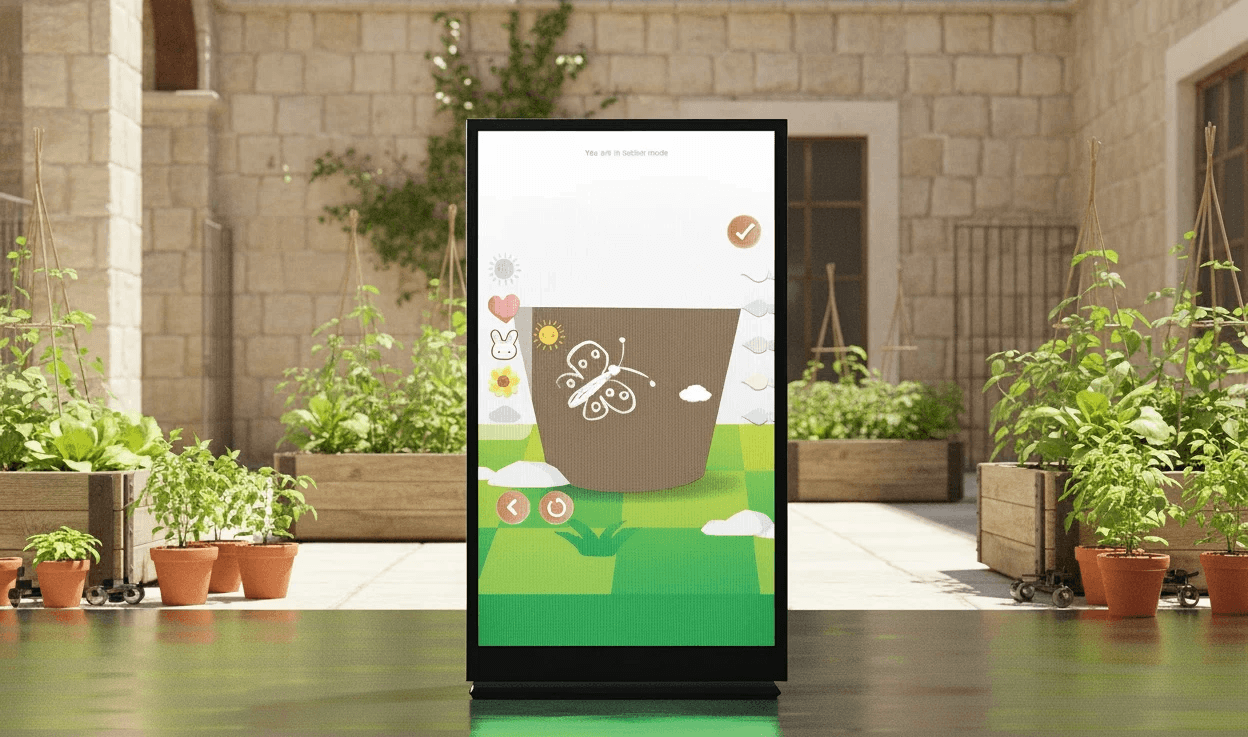
Toorak Village is critically lacking in green and engaging public areas. The current spaces are limited in their opportunities to foster family connection and inter-community relationships.
Toorak Village is critically lacking in green and engaging public areas. The current spaces are limited in their opportunities to foster family connection and inter-community relationships.
Solution
Solution
A hybrid digital placemaking experience combining interactive displays and live workshops to create a welcoming, family-friendly Toorak Village.
A hybrid digital placemaking experience combining interactive displays and live workshops to create a welcoming, family-friendly Toorak Village.
Softwares Used
Figma
Adobe Stock
Role
UX/UI Designer
UX Researcher
Project Duration
12 weeks
Stage 01 :
Who we are designing for
Stage 01 :
Who we are designing for
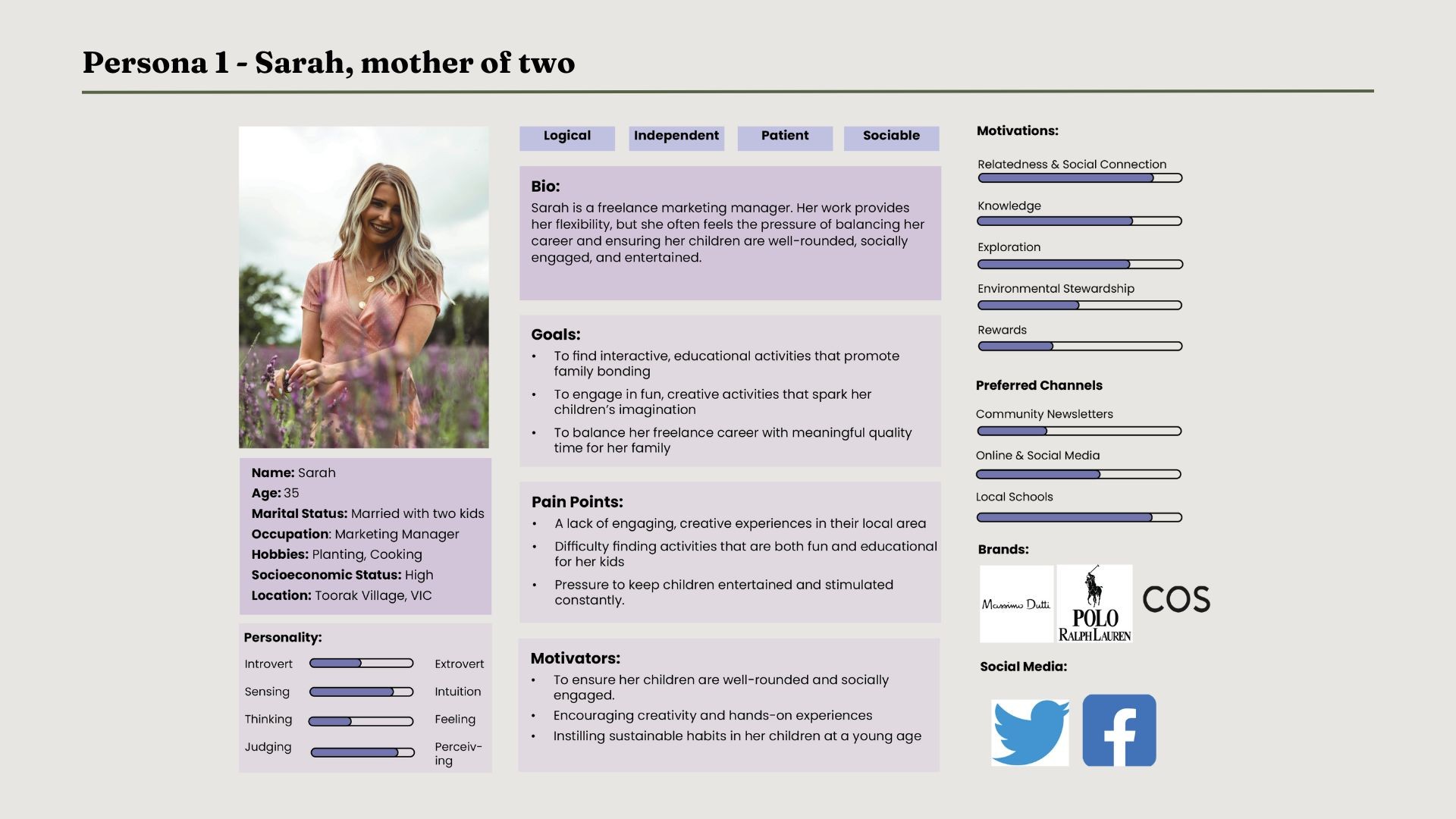
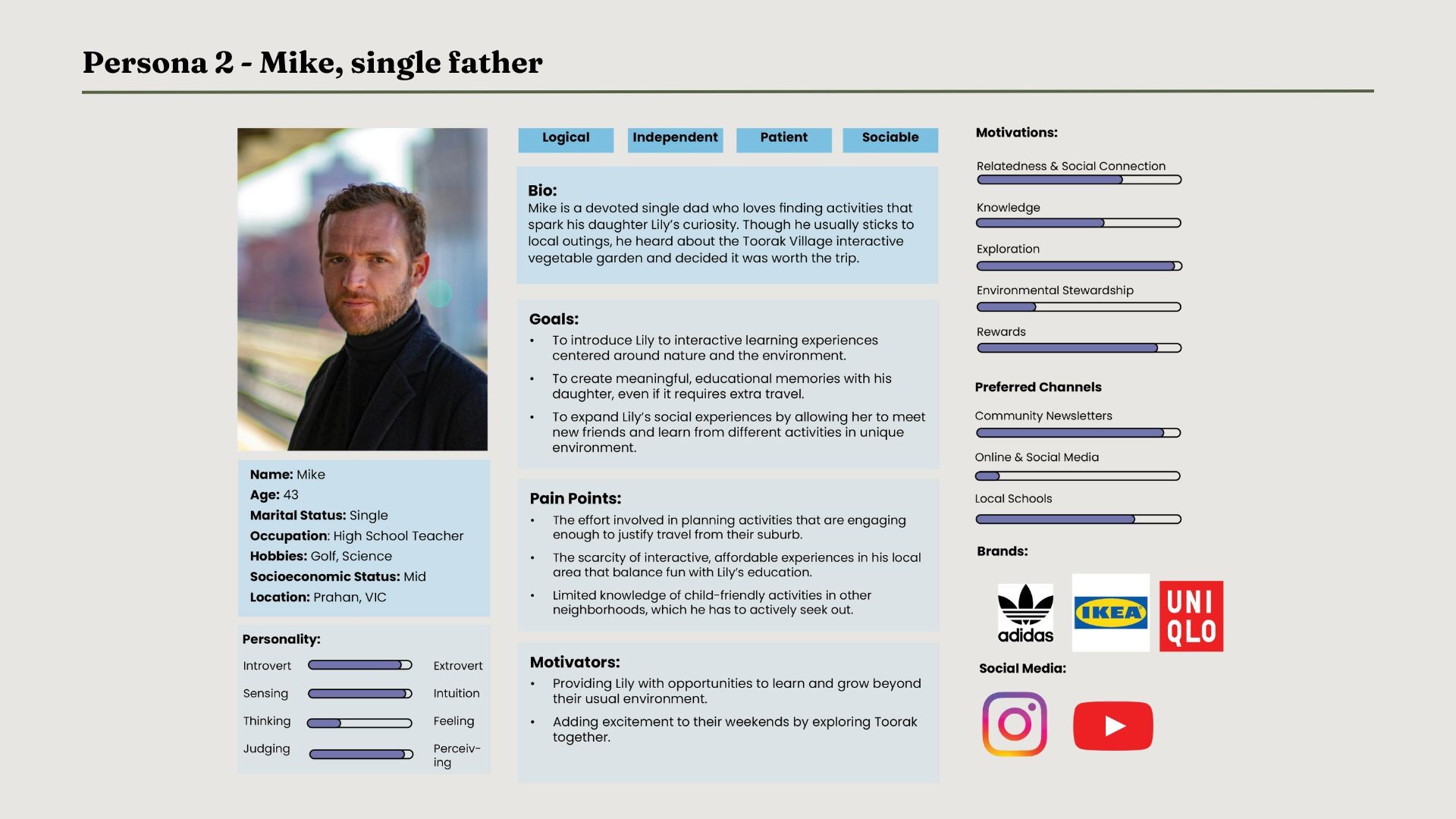
My team and I began by visiting Toorak Village to understand the environment, followed by primary research in which I led 7 interviews with real users.
My team and I began by visiting Toorak Village to understand the environment, followed by primary research in which I led 7 interviews with real users.
"I would like to see more parks in the area and somewhere to go sit down to have lunch"
"I would participate in community events in Toorak if it's an outdoor activity, or if it's something new to town"
"More public gathering areas like green spaces would be great to see here"
"The area is very dead, and the business is not doing well. Digital installation could help to bring traffic, like something to help market my business"
"I only come here for work and leave straight after. There's nothing much to do or see here"
"I just come here to get my groceries and leave. I usually go to the city or South Yarra for activities"
"There isn't any activity here. The community is made up of mainly older people"
"Not too sure how to improve Toorak Village, this place is always quiet, people just come and go"
"I am a local here, if there are any events or activities around, I would most probably join"
"I would like to see more parks in the area and somewhere to go sit down to have lunch"
"I would participate in community events in Toorak if it's an outdoor activity, or if it's something new to town"
"More public gathering areas like green spaces would be great to see here"
"The area is very dead, and the business is not doing well. Digital installation could help to bring traffic, like something to help market my business"
"I only come here for work and leave straight after. There's nothing much to do or see here"
"I just come here to get my groceries and leave. I usually go to the city or South Yarra for activities"
"There isn't any activity here. The community is made up of mainly older people"
"Not too sure how to improve Toorak Village, this place is always quiet, people just come and go"
"I am a local here, if there are any events or activities around, I would most probably join"
"I would like to see more parks in the area and somewhere to go sit down to have lunch"
"I would participate in community events in Toorak if it's an outdoor activity, or if it's something new to town"
"More public gathering areas like green spaces would be great to see here"
"The area is very dead, and the business is not doing well. Digital installation could help to bring traffic, like something to help market my business"
"I only come here for work and leave straight after. There's nothing much to do or see here"
"I just come here to get my groceries and leave. I usually go to the city or South Yarra for activities"
"There isn't any activity here. The community is made up of mainly older people"
"Not too sure how to improve Toorak Village, this place is always quiet, people just come and go"
"I am a local here, if there are any events or activities around, I would most probably join"
"I would like to see more parks in the area and somewhere to go sit down to have lunch"
"I would participate in community events in Toorak if it's an outdoor activity, or if it's something new to town"
"More public gathering areas like green spaces would be great to see here"
"The area is very dead, and the business is not doing well. Digital installation could help to bring traffic, like something to help market my business"
"I only come here for work and leave straight after. There's nothing much to do or see here"
"I just come here to get my groceries and leave. I usually go to the city or South Yarra for activities"
"There isn't any activity here. The community is made up of mainly older people"
"Not too sure how to improve Toorak Village, this place is always quiet, people just come and go"
"I am a local here, if there are any events or activities around, I would most probably join"
"I would like to see more parks in the area and somewhere to go sit down to have lunch"
"I would participate in community events in Toorak if it's an outdoor activity, or if it's something new to town"
"More public gathering areas like green spaces would be great to see here"
"The area is very dead, and the business is not doing well. Digital installation could help to bring traffic, like something to help market my business"
"I only come here for work and leave straight after. There's nothing much to do or see here"
"I just come here to get my groceries and leave. I usually go to the city or South Yarra for activities"
"There isn't any activity here. The community is made up of mainly older people"
"Not too sure how to improve Toorak Village, this place is always quiet, people just come and go"
"I am a local here, if there are any events or activities around, I would most probably join"
"I would like to see more parks in the area and somewhere to go sit down to have lunch"
"I would participate in community events in Toorak if it's an outdoor activity, or if it's something new to town"
"More public gathering areas like green spaces would be great to see here"
"The area is very dead, and the business is not doing well. Digital installation could help to bring traffic, like something to help market my business"
"I only come here for work and leave straight after. There's nothing much to do or see here"
"I just come here to get my groceries and leave. I usually go to the city or South Yarra for activities"
"There isn't any activity here. The community is made up of mainly older people"
"Not too sure how to improve Toorak Village, this place is always quiet, people just come and go"
"I am a local here, if there are any events or activities around, I would most probably join"
"I would like to see more parks in the area and somewhere to go sit down to have lunch"
"I would participate in community events in Toorak if it's an outdoor activity, or if it's something new to town"
"More public gathering areas like green spaces would be great to see here"
"The area is very dead, and the business is not doing well. Digital installation could help to bring traffic, like something to help market my business"
"I only come here for work and leave straight after. There's nothing much to do or see here"
"I just come here to get my groceries and leave. I usually go to the city or South Yarra for activities"
"There isn't any activity here. The community is made up of mainly older people"
"Not too sure how to improve Toorak Village, this place is always quiet, people just come and go"
"I am a local here, if there are any events or activities around, I would most probably join"
"I would like to see more parks in the area and somewhere to go sit down to have lunch"
"I would participate in community events in Toorak if it's an outdoor activity, or if it's something new to town"
"More public gathering areas like green spaces would be great to see here"
"The area is very dead, and the business is not doing well. Digital installation could help to bring traffic, like something to help market my business"
"I only come here for work and leave straight after. There's nothing much to do or see here"
"I just come here to get my groceries and leave. I usually go to the city or South Yarra for activities"
"There isn't any activity here. The community is made up of mainly older people"
"Not too sure how to improve Toorak Village, this place is always quiet, people just come and go"
"I am a local here, if there are any events or activities around, I would most probably join"
[Toorak Village Interview Results]
[Toorak Village Interview Results]
Key findings in user interest
Key findings in user interest
44%
Outdoor activities
44%
Outdoor activities
33%
Digital installation
33%
Digital installation
22%
Not interested in any
22%
Not interested in any
Client Requirements
Client Requirements
User Needs
User Needs
Design for Families
Family-friendly facilities
Design for Families
Family-friendly facilities
Engage Community
Digital placemaking for interaction
Safe Play Zones
Safe spaces for children
Safe Play Zones
Safe spaces for children
Inclusive Access
Accessible to all
Inclusive Access
Accessible to all
Family Connection
Spend quality time together
Family Connection
Spend quality time together
Build Local Identity
Make Toorak Village memorable
Build Local Identity
Make Toorak Village memorable
Engage Community
Digital placemaking for interaction
Target Users
Target Users
The primary target users are parents and school-aged children, driven by the presence of multiple nearby schools.
The primary target users are parents and school-aged children, driven by the presence of multiple nearby schools.
How the User Interacts
How the User Interacts
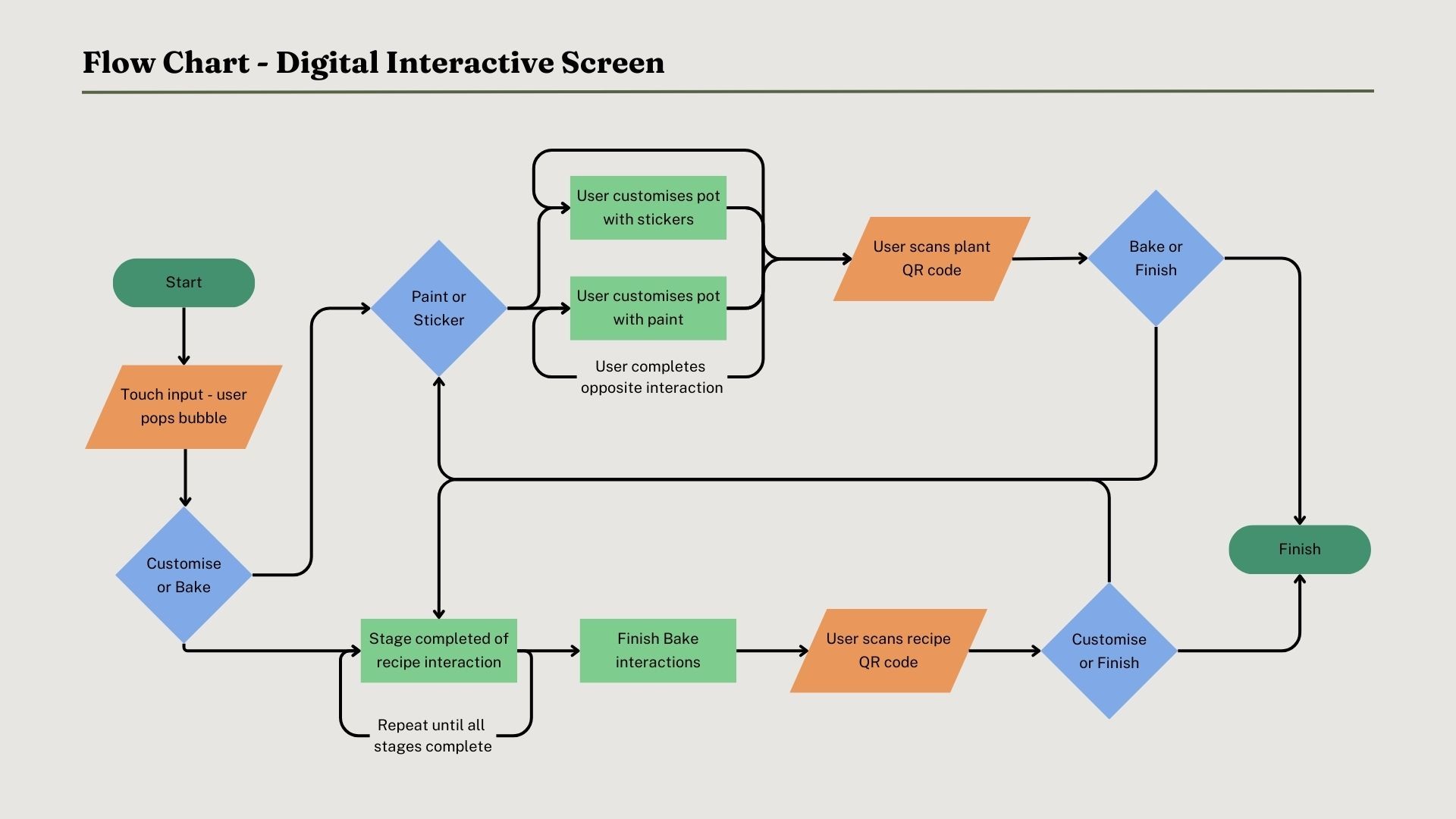
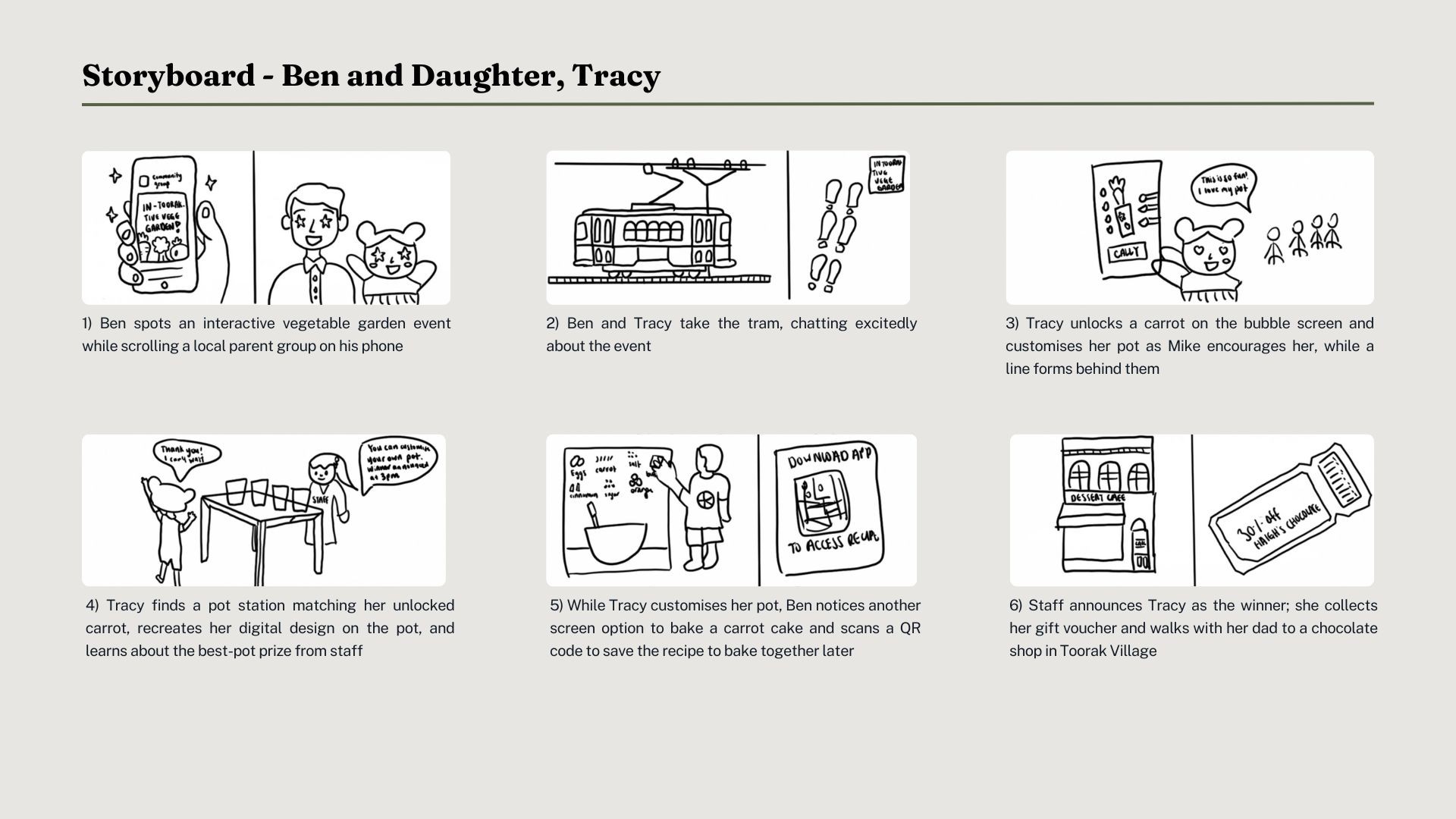
Visualising the user journey with a flow chart and storyboard, showing how users transition from digital interaction to physical space.
Visualising the user journey with a flow chart and storyboard, showing how users transition from digital interaction to physical space.
Stage 02 :
Design development
Stage 02 :
Design development
The design process began with paper sketches to explore installation and digital screen interactions, followed by a low-fidelity LEGO prototype to test spatial relationships.
The design process began with paper sketches to explore installation and digital screen interactions, followed by a low-fidelity LEGO prototype to test spatial relationships.
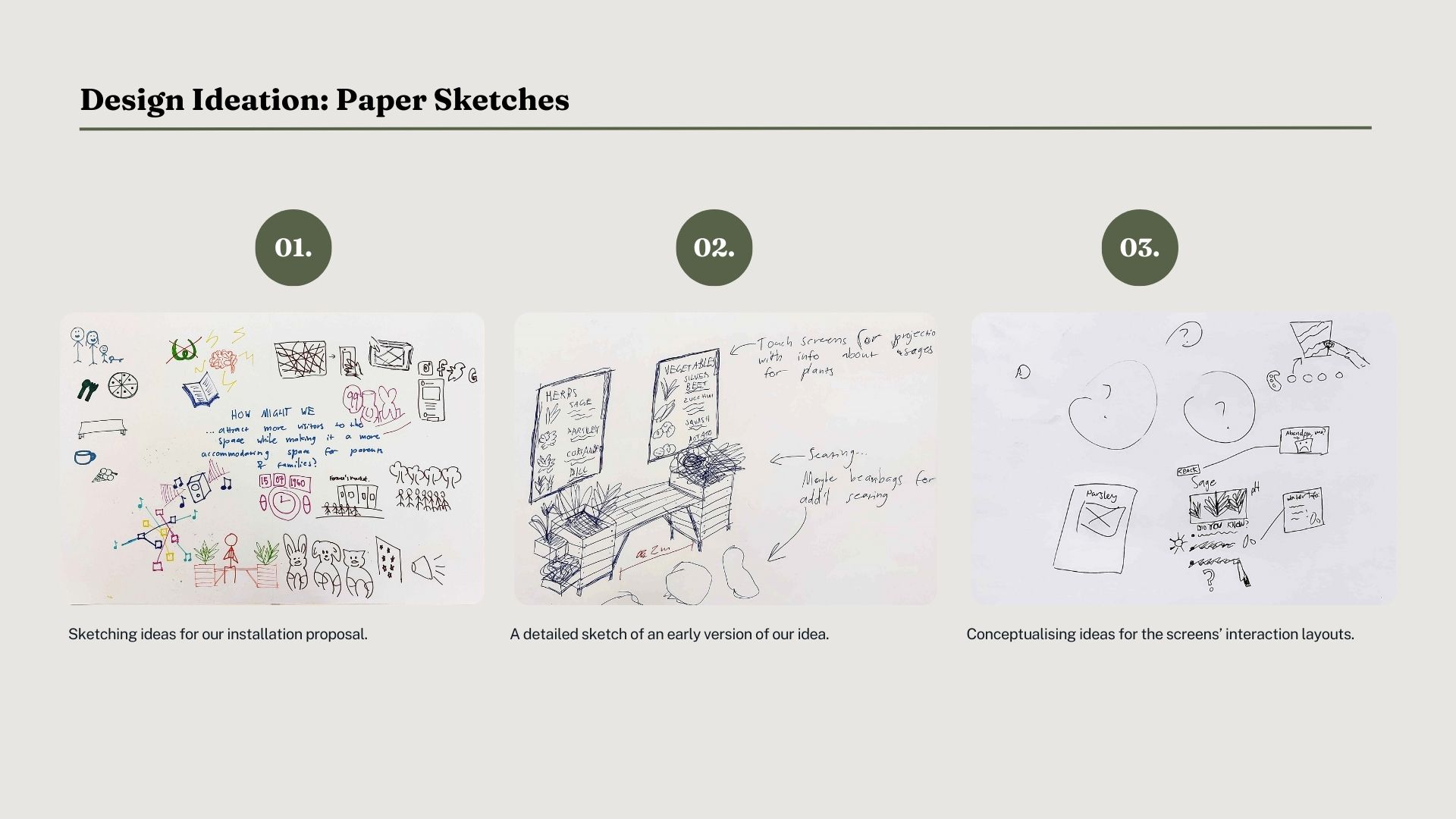
[Brainstorming through paper sketches]
[Brainstorming through paper sketches]
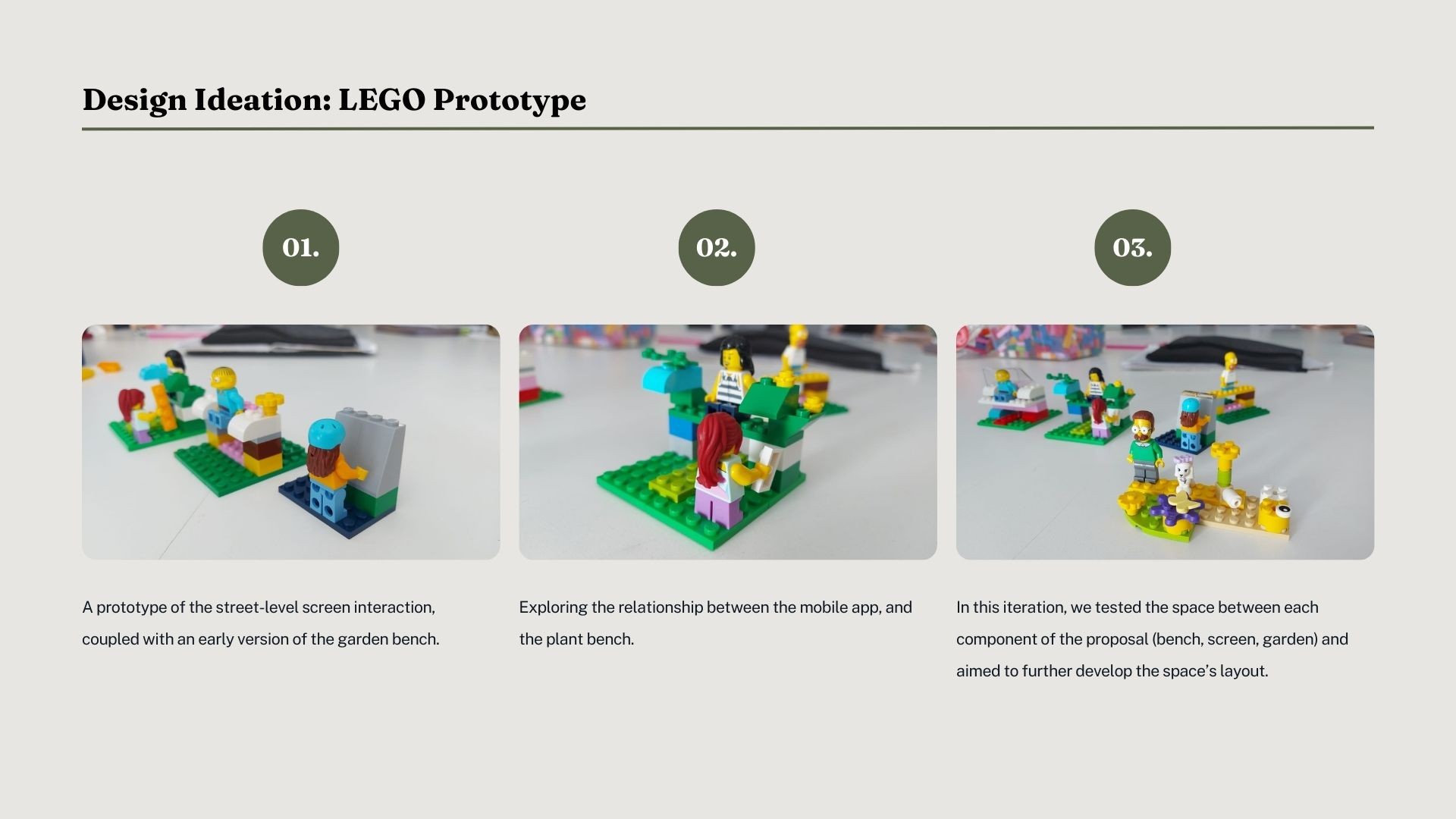
[Planning space layout with LEGO: garden, screen, and bench]
[Planning space layout with LEGO:
garden, screen, and bench]
Accessibility &
Inclusivity Factors
Accessibility &
Inclusivity Factors
To create a comfortable and engaging experience for all users, accessibility and inclusivity were considered across the physical space, tools used, and digital interactions.
To create a comfortable and engaging experience for all users, accessibility and inclusivity were considered across the physical space, tools used, and digital interactions.
Physical - Space
Public Benches
Address the lack of public seating and encourage community interaction through an inviting environment
Open Walkways
Spacious area with clear, unobstructed paths to support easy movement and full participation in activities
Pram/Wheelchair Access
Participants with mobility needs can engage in activities directly or indirectly, through presence or participation
Physical - Tools Used (Digital Billboard)
Board Size
Appropriately sized for an immersive experience and to accommodate multi-user interaction
Button Placement
Positioned at an accessible height for all users, including children and wheelchair users, relative to the board size
Multi-User Access
Double-sided board with interactive and motion-tracking screens to engage multiple users at once
Visual/Cognitive - Digital Design
Bright Colours &
Playful Animations
Engaging visuals to capture attention and immerse children in a playful, learning experience
Colour Contrast
Clear text and buttons, easily distinguishable from the background to support interaction for all users
Guided Instructions
Using touch gestures and universal icons helps users of varying comprehension abilities interact intuitively
Physical - Space
Public Benches
Address the lack of public seating and encourage community interaction through an inviting environment
Open Walkways
Spacious area with clear, unobstructed paths to support easy movement and full participation in activities
Pram/Wheelchair Access
Participants with mobility needs can engage in activities directly or indirectly, through presence or participation
Physical - Tools Used (Digital Billboard)
Board Size
Appropriately sized for an immersive experience and to accommodate multi-user interaction
Button Placement
Positioned at an accessible height for all users, including children and wheelchair users, relative to the board size
Multi-User Access
Double-sided board with interactive and motion-tracking screens to engage multiple users at once
Visual/Cognitive - Digital Design
Bright Colours &
Playful Animations
Engaging visuals to capture attention and immerse children in a playful, learning experience
Colour Contrast
Clear text and buttons, easily distinguishable from the background to support interaction for all users
Guided Instructions
Using touch gestures and universal icons helps users of varying comprehension abilities interact intuitively
Physical - Space
Public Benches
Address the lack of public seating and encourage community interaction through an inviting environment
Open Walkways
Spacious area with clear, unobstructed paths to support easy movement and full participation in activities
Pram/Wheelchair Access
Participants with mobility needs can engage in activities directly or indirectly, through presence or participation
Physical - Tools Used (Digital Billboard)
Board Size
Appropriately sized for an immersive experience and to accommodate multi-user interaction
Button Placement
Positioned at an accessible height for all users, including children and wheelchair users, relative to the board size
Multi-User Access
Double-sided board with interactive and motion-tracking screens to engage multiple users at once
Visual/Cognitive - Digital Design
Bright Colours &
Playful Animations
Engaging visuals to capture attention and immerse children in a playful, learning experience
Colour Contrast
Clear text and buttons, easily distinguishable from the background to support interaction for all users
Guided Instructions
Using touch gestures and universal icons helps users of varying comprehension abilities interact intuitively
Physical - Space
Public Benches
Address the lack of public seating and encourage community interaction through an inviting environment
Open Walkways
Spacious area with clear, unobstructed paths to support easy movement and full participation in activities
Pram/Wheelchair Access
Participants with mobility needs can engage in activities directly or indirectly, through presence or participation
Physical - Tools Used (Digital Billboard)
Board Size
Appropriately sized for an immersive experience and to accommodate multi-user interaction
Button Placement
Positioned at an accessible height for all users, including children and wheelchair users, relative to the board size
Multi-User Access
Double-sided board with interactive and motion-tracking screens to engage multiple users at once
Visual/Cognitive - Digital Design
Bright Colours &
Playful Animations
Engaging visuals to capture attention and immerse children in a playful, learning experience
Colour Contrast
Clear text and buttons, easily distinguishable from the background to support interaction for all users
Guided Instructions
Using touch gestures and universal icons helps users of varying comprehension abilities interact intuitively
Physical - Space
Pram & Wheelchair Access
Participants with mobility needs can engage in activities directly or indirectly, through presence or participation
Public Benches
Address the lack of public seating and encourage community interaction through an inviting environment
Open Walkways
Spacious area with clear, unobstructed paths to support easy movement and full participation in activities
Physical - Tools Used (Digital Billboard)
Board Size
Appropriately sized for an immersive experience and to accommodate multi-user interaction
Button Placement
Positioned at an accessible height for all users, including children and wheelchair users, relative to the board size
Multi-User Access
Double-sided board with interactive and motion-tracking screens to engage multiple users at once
Visual/Cognitive - Digital Design
Bright Colours & Playful Animations
Engaging visuals to capture attention and immerse children in a playful, learning experience
Colour Contrast
Clear text and buttons, easily distinguishable from the background to support interaction for all users
Guided Instructions
Using touch gestures and universal icons helps users of varying comprehension abilities interact intuitively
Physical - Space
Pram & Wheelchair Access
Participants with mobility needs can engage in activities directly or indirectly, through presence or participation
Public Benches
Address the lack of public seating and encourage community interaction through an inviting environment
Open Walkways
Spacious area with clear, unobstructed paths to support easy movement and full participation in activities
Physical - Tools Used (Digital Billboard)
Board Size
Appropriately sized for an immersive experience and to accommodate multi-user interaction
Button Placement
Positioned at an accessible height for all users, including children and wheelchair users, relative to the board size
Multi-User Access
Double-sided board with interactive and motion-tracking screens to engage multiple users at once
Visual/Cognitive - Digital Design
Bright Colours & Playful Animations
Engaging visuals to capture attention and immerse children in a playful, learning experience
Colour Contrast
Clear text and buttons, easily distinguishable from the background to support interaction for all users
Guided Instructions
Using touch gestures and universal icons helps users of varying comprehension abilities interact intuitively
Physical - Space
Pram & Wheelchair Access
Participants with mobility needs can engage in activities directly or indirectly, through presence or participation
Public Benches
Address the lack of public seating and encourage community interaction through an inviting environment
Open Walkways
Spacious area with clear, unobstructed paths to support easy movement and full participation in activities
Physical - Tools Used (Digital Billboard)
Board Size
Appropriately sized for an immersive experience and to accommodate multi-user interaction
Button Placement
Positioned at an accessible height for all users, including children and wheelchair users, relative to the board size
Multi-User Access
Double-sided board with interactive and motion-tracking screens to engage multiple users at once
Visual/Cognitive - Digital Design
Bright Colours & Playful Animations
Engaging visuals to capture attention and immerse children in a playful, learning experience
Colour Contrast
Clear text and buttons, easily distinguishable from the background to support interaction for all users
Guided Instructions
Using touch gestures and universal icons helps users of varying comprehension abilities interact intuitively
Physical - Space
Pram & Wheelchair Access
Participants with mobility needs can engage in activities directly or indirectly, through presence or participation
Public Benches
Address the lack of public seating and encourage community interaction through an inviting environment
Open Walkways
Spacious area with clear, unobstructed paths to support easy movement and full participation in activities
Physical - Tools Used (Digital Billboard)
Board Size
Appropriately sized for an immersive experience and to accommodate multi-user interaction
Button Placement
Positioned at an accessible height for all users, including children and wheelchair users, relative to the board size
Multi-User Access
Double-sided board with interactive and motion-tracking screens to engage multiple users at once
Visual/Cognitive - Digital Design
Bright Colours & Playful Animations
Engaging visuals to capture attention and immerse children in a playful, learning experience
Colour Contrast
Clear text and buttons, easily distinguishable from the background to support interaction for all users
Guided Instructions
Using touch gestures and universal icons helps users of varying comprehension abilities interact intuitively
Chosen Space:
Courtyard outside Coles
Chosen Space:
Courtyard outside Coles
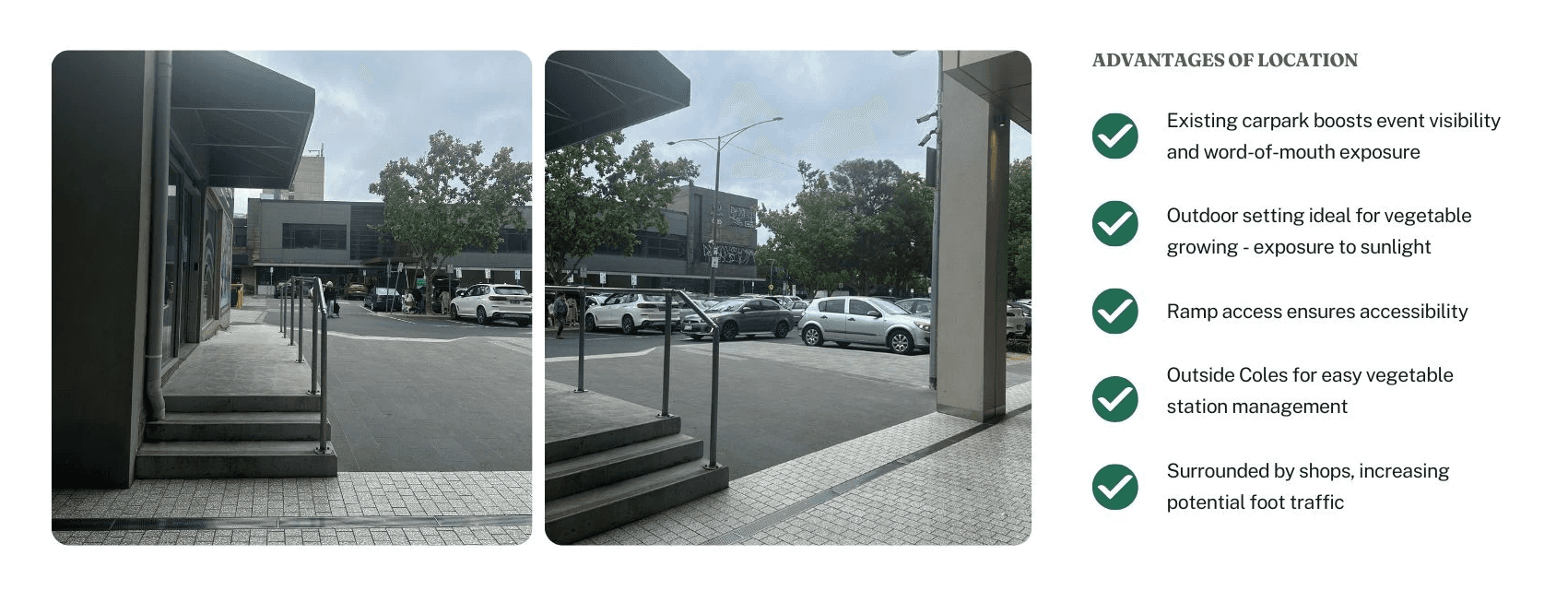
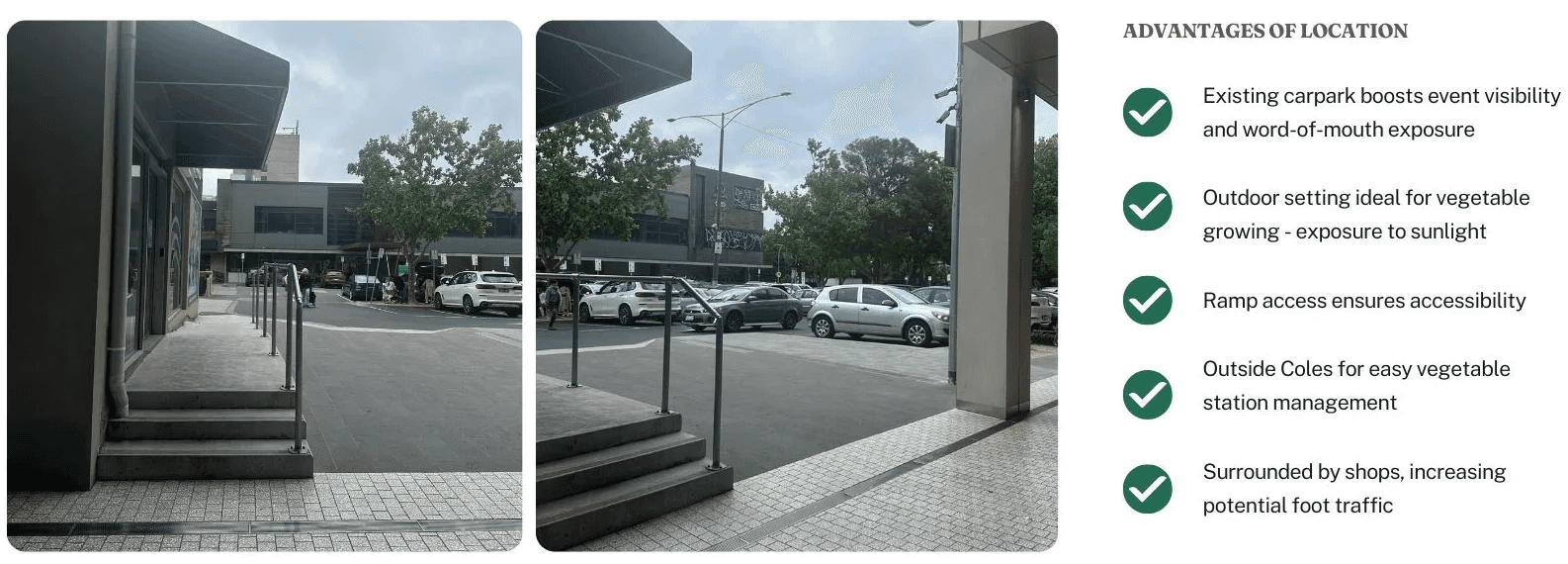
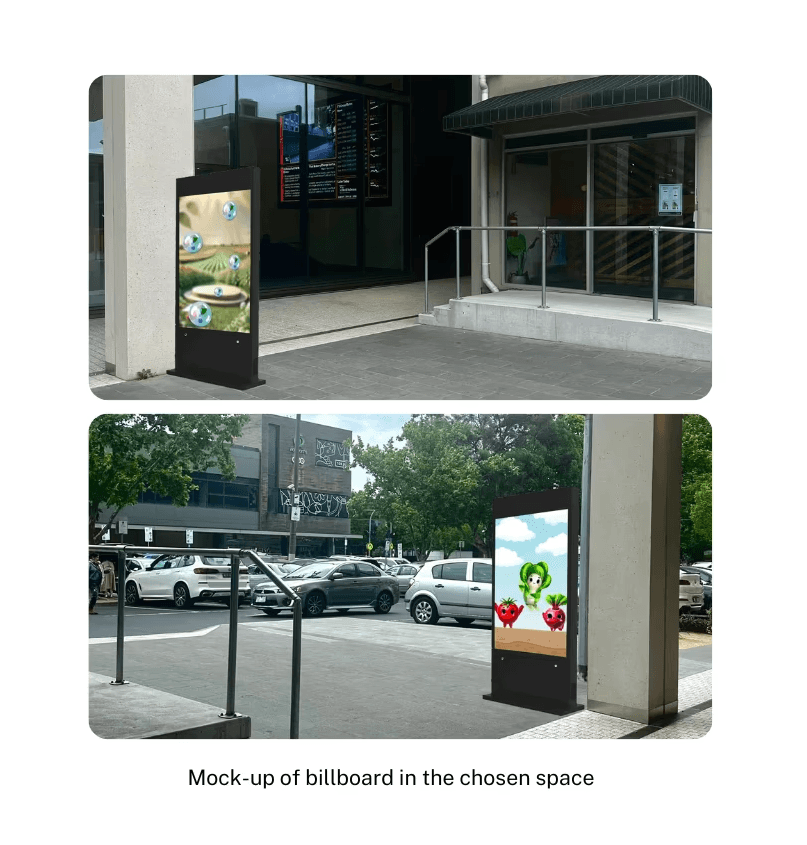
Aligned with accessibility needs, the courtyard, an outdoor shared space between TOK H Mall and Coles, offers ample space for the vegetable station and digital billboard.
Aligned with accessibility needs, the courtyard, an outdoor shared space between TOK H Mall and Coles, offers ample space for the vegetable station and digital billboard.
User Testing:
Design Evaluation
User Testing:
Design Evaluation
In-class testing with 5 participants gathered quantitative feedback on usability, functionality, and aesthetics, shaping the final design and solution.
In-class testing with 5 participants gathered quantitative feedback on usability, functionality, and aesthetics, shaping the final design and solution.
STRENGTHS
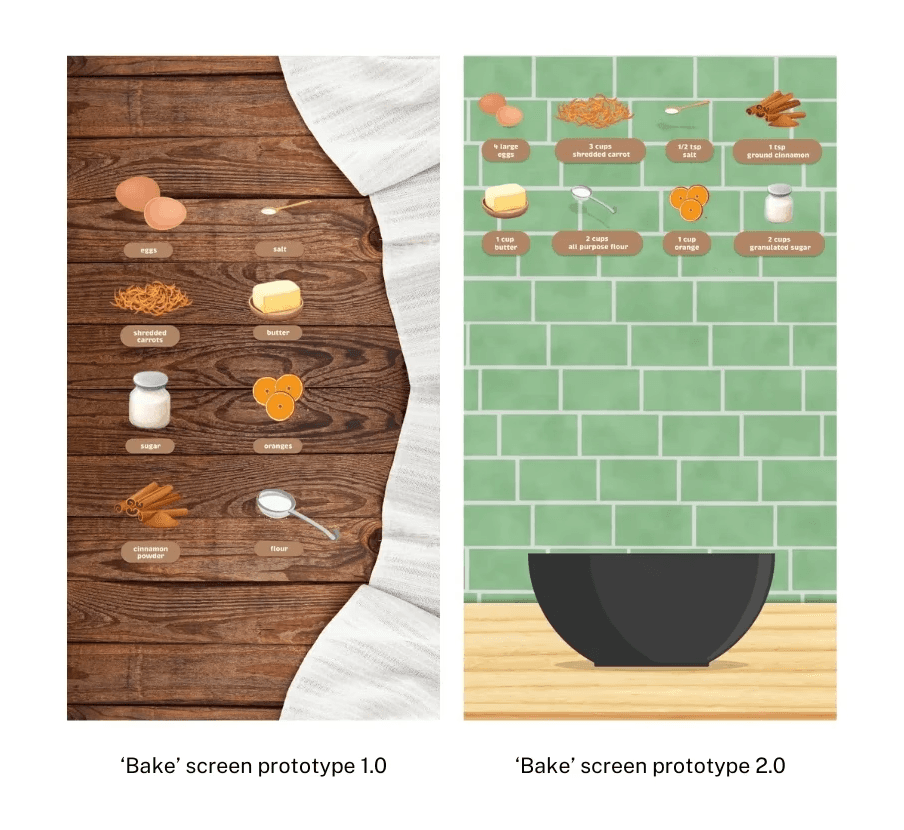
Bright colours & playful animations - Enhance engagement and captures attention
Simple touch gestures - Make navigation intuitive and easy
WEAKNESSES
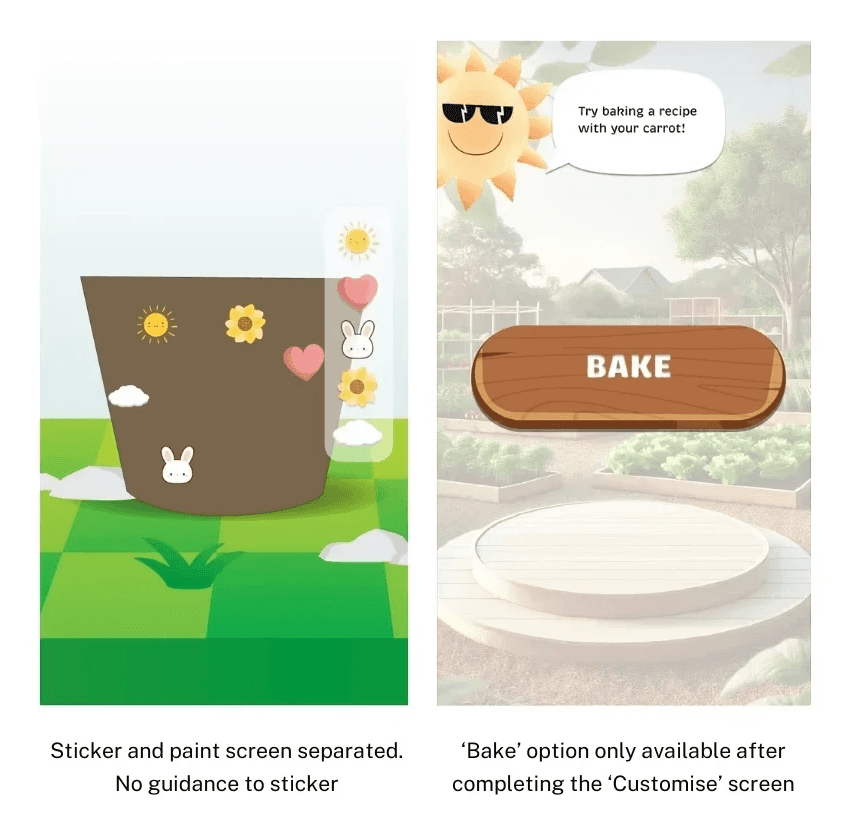
No tutorials - Lowers engagement and creates user confusion on how to interact with the system
Cluttered interface - Hard to focus on key tasks and overwhelm users
IMPROVEMENTS MADE
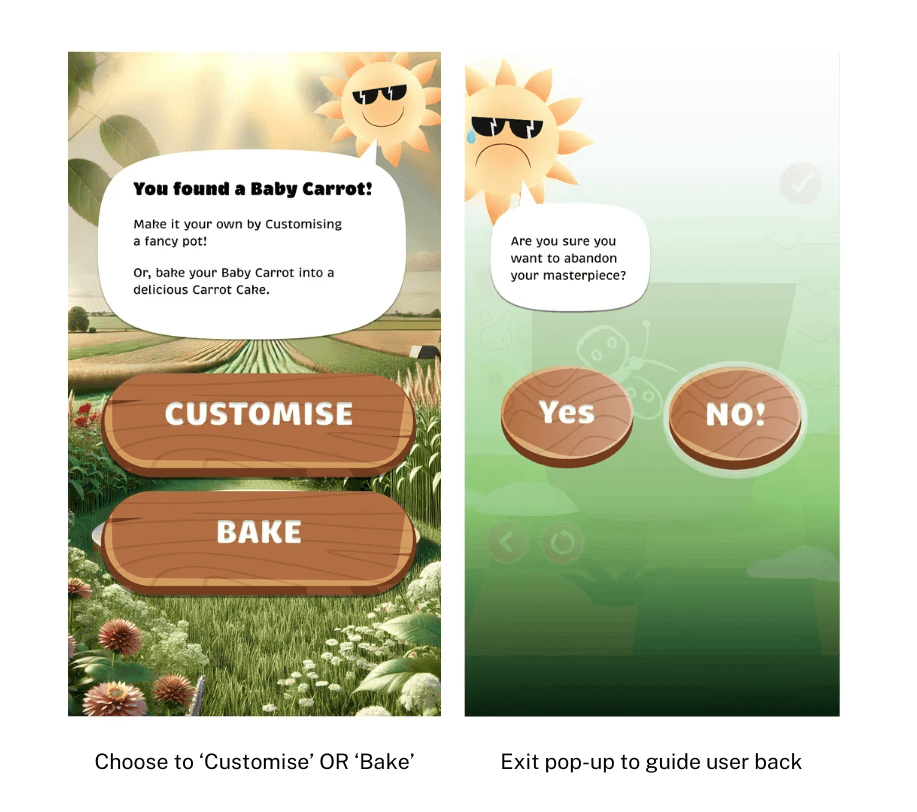
Added tutorials - Guide users through interactions using a mascot
Separated the 'Customise' and 'Bake' screens - Enables faster play for more users
Add audio feedback - Enhance engagement and accessibility
Motion-sensing interaction - Use without touch, improving hygiene and accessibility
FUTURE CONSIDERATIONS
STRENGTHS
Bright colours & playful animations - Enhance engagement and captures attention
Simple touch gestures - Make navigation intuitive and easy
WEAKNESSES
No tutorials - Lowers engagement and creates user confusion on how to interact with the system
Cluttered interface - Hard to focus on key tasks and overwhelm users
IMPROVEMENTS MADE
Added tutorials - Guide users through interactions using a mascot
Separated the 'Customise' and 'Bake' screens - Enables faster play for more users
Add audio feedback - Enhance engagement and accessibility
Motion-sensing interaction - Use without touch, improving hygiene and accessibility
FUTURE CONSIDERATIONS
STRENGTHS
Bright colours & playful animations - Enhance engagement and captures attention
Simple touch gestures - Make navigation intuitive and easy
WEAKNESSES
No tutorials - Lowers engagement and creates user confusion on how to interact with the system
Cluttered interface - Hard to focus on key tasks and overwhelm users
IMPROVEMENTS MADE
Added tutorials - Guide users through interactions using a mascot
Separated the 'Customise' and 'Bake' screens - Enables faster play for more users
Add audio feedback - Enhance engagement and accessibility
Motion-sensing interaction - Use without touch, improving hygiene and accessibility
FUTURE CONSIDERATIONS
STRENGTHS
Bright colours & playful animations - Enhance engagement and captures attention
Simple touch gestures - Make navigation intuitive and easy
WEAKNESSES
No tutorials - Lowers engagement and creates user confusion on how to interact with the system
Cluttered interface - Hard to focus on key tasks and overwhelm users
IMPROVEMENTS MADE
Added tutorials - Guide users through interactions using a mascot
Separated the 'Customise' and 'Bake' screens - Enables faster play for more users
Add audio feedback - Enhance engagement and accessibility
Motion-sensing interaction - Use without touch, improving hygiene and accessibility
FUTURE CONSIDERATIONS
Bright colours & playful animations - Enhance engagement and captures attention
Simple touch gestures - Make navigation intuitive and easy
STRENGTHS
No tutorials - Lowers engagement and creates user confusion on how to interact with the system
Cluttered interface - Hard to focus on key tasks and overwhelm users
WEAKNESSES
Added tutorials - Guide users through interactions using a mascot
Separated the 'Customise' and 'Bake' screens - Enables faster play for more users
Add audio feedback - Enhance engagement and accessibility
Motion-sensing interaction - Use without touch, improving hygiene and accessibility
FUTURE CONSIDERATIONS
IMPROVEMENTS MADE
Bright colours & playful animations - Enhance engagement and captures attention
Simple touch gestures - Make navigation intuitive and easy
STRENGTHS
No tutorials - Lowers engagement and creates user confusion on how to interact with the system
Cluttered interface - Hard to focus on key tasks and overwhelm users
WEAKNESSES
Added tutorials - Guide users through interactions using a mascot
Separated the 'Customise' and 'Bake' screens - Enables faster play for more users
Add audio feedback - Enhance engagement and accessibility
Motion-sensing interaction - Use without touch, improving hygiene and accessibility
FUTURE CONSIDERATIONS
IMPROVEMENTS MADE
Bright colours & playful animations - Enhance engagement and captures attention
Simple touch gestures - Make navigation intuitive and easy
STRENGTHS
No tutorials - Lowers engagement and creates user confusion on how to interact with the system
Cluttered interface - Hard to focus on key tasks and overwhelm users
WEAKNESSES
Added tutorials - Guide users through interactions using a mascot
Separated the 'Customise' and 'Bake' screens - Enables faster play for more users
Add audio feedback - Enhance engagement and accessibility
Motion-sensing interaction - Use without touch, improving hygiene and accessibility
FUTURE CONSIDERATIONS
IMPROVEMENTS MADE
Bright colours & playful animations - Enhance engagement and captures attention
Simple touch gestures - Make navigation intuitive and easy
STRENGTHS
No tutorials - Lowers engagement and creates user confusion on how to interact with the system
Cluttered interface - Hard to focus on key tasks and overwhelm users
WEAKNESSES
Added tutorials - Guide users through interactions using a mascot
Separated the 'Customise' and 'Bake' screens - Enables faster play for more users
Add audio feedback - Enhance engagement and accessibility
Motion-sensing interaction - Use without touch, improving hygiene and accessibility
FUTURE CONSIDERATIONS
IMPROVEMENTS MADE
Stage 03 :
Final Design
Stage 03 :
Final Design
The experience combines two components: I designed the Action Hub Screen (Side A) and conceptualised the live on-site workshop, including security considerations.
The experience combines two components: I designed the Action Hub Screen (Side A) and conceptualised the live on-site workshop, including security considerations.
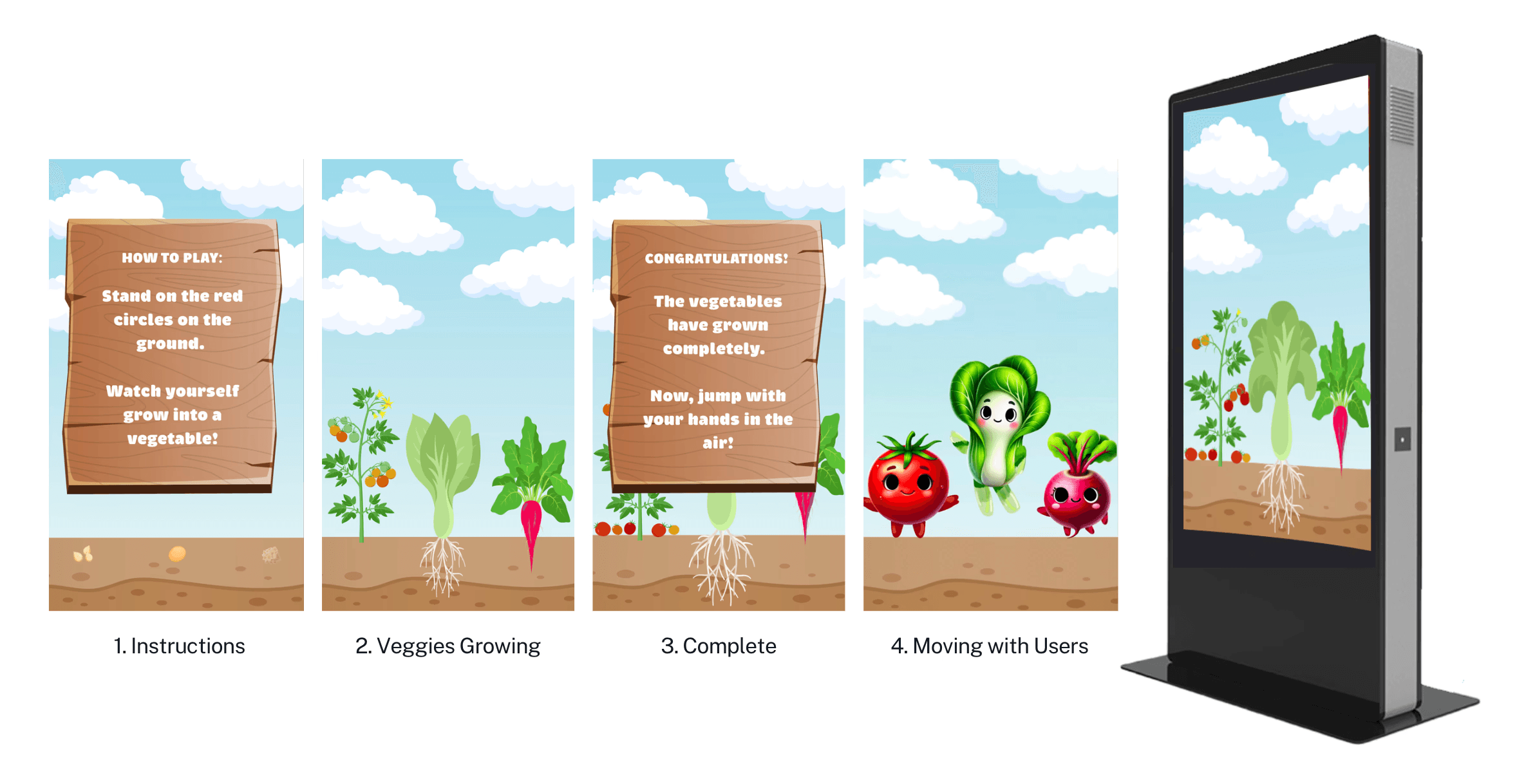
Digital Interactive Board
Option 1:
Action Hub Screen (SIDE A)
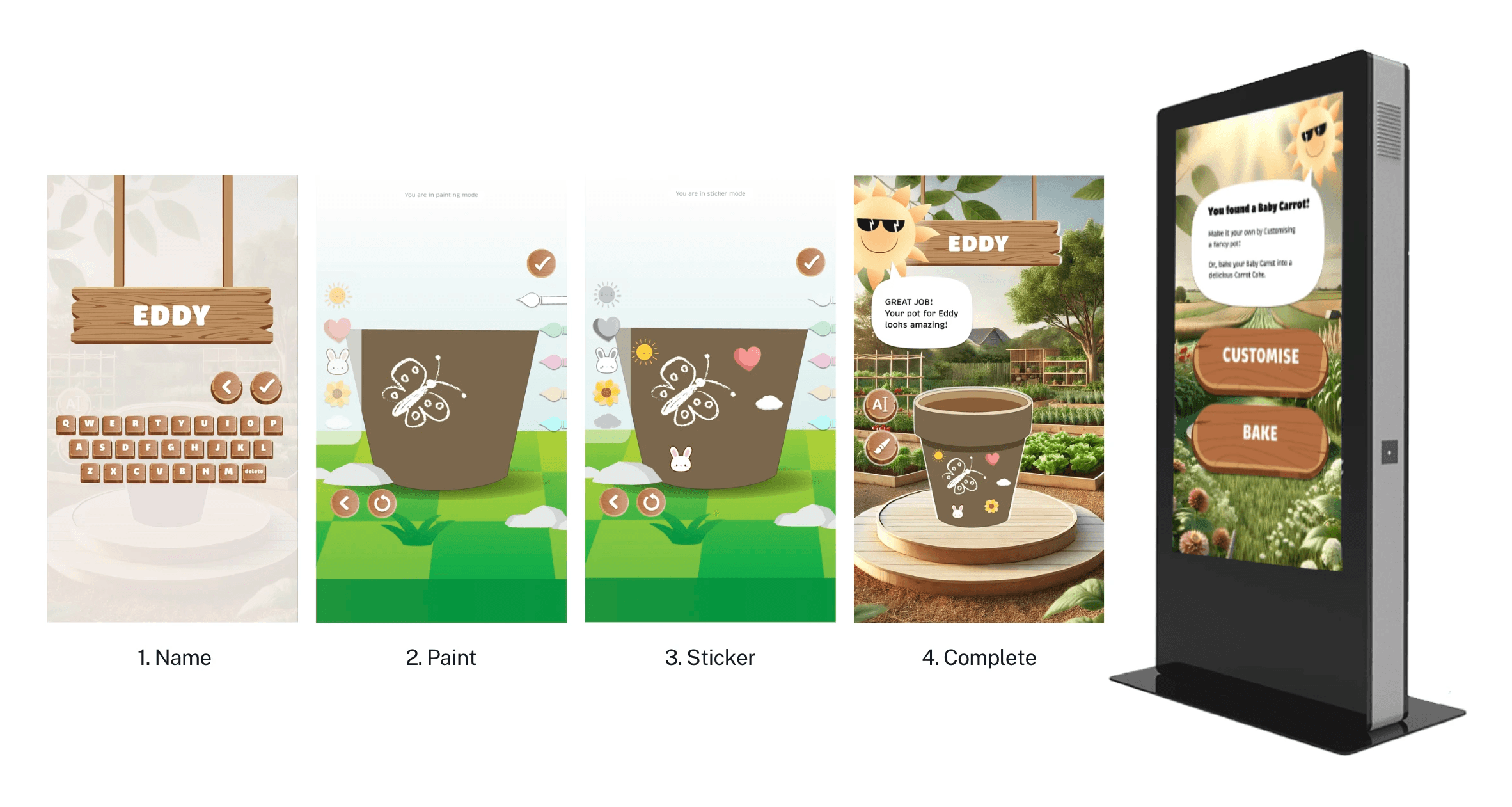
Virtually customise your pot
Features: name, paint, sticker
Digital Interactive Board
Option 2:
Action Hub Screen (SIDE A)
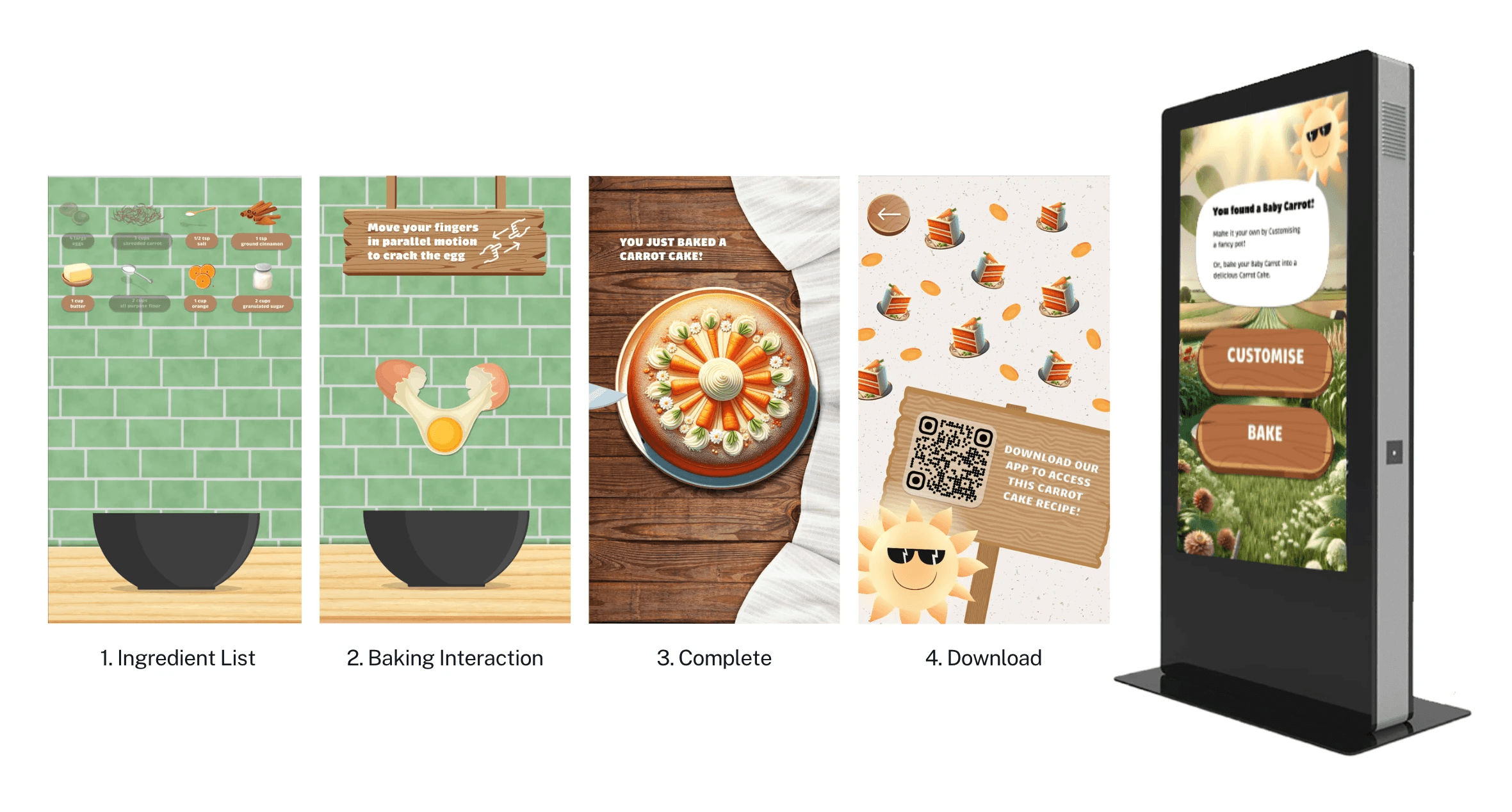
Virtually cook a recipe with your chosen veggie
Scan QR code to download recipe to mobile
Digital Interactive Board
Purpose:
Motion Tracking Screen (SIDE B)
Attract passer-by to the space
Garner interest in portable garden workshop
Digital Interactive Board
Option 1:
Action Hub Screen (SIDE A)
Virtually customise your pot
Features: name, paint, sticker
Digital Interactive Board
Option 2:
Action Hub Screen (SIDE A)
Virtually cook a recipe with your chosen veggie
Scan QR code to download recipe to mobile
Digital Interactive Board
Purpose:
Motion Tracking Screen (SIDE B)
Attract passer-by to the space
Garner interest in portable garden workshop
Digital Interactive Board
Option 1:
Action Hub Screen (SIDE A)
Virtually customise your pot
Features: name, paint, sticker
Digital Interactive Board
Option 2:
Action Hub Screen (SIDE A)
Virtually cook a recipe with your chosen veggie
Scan QR code to download recipe to mobile
Digital Interactive Board
Purpose:
Motion Tracking Screen (SIDE B)
Attract passer-by to the space
Garner interest in portable garden workshop
Digital Interactive Board
Option 1:
Action Hub Screen (SIDE A)
Virtually customise your pot
Features: name, paint, sticker
Digital Interactive Board
Option 2:
Action Hub Screen (SIDE A)
Virtually cook a recipe with your chosen veggie
Scan QR code to download recipe to mobile
Digital Interactive Board
Purpose:
Motion Tracking Screen (SIDE B)
Attract passer-by to the space
Garner interest in portable garden workshop
Digital Interactive Board
Option 1:
Action Hub Screen (SIDE A)
Virtually customise your pot
Features: name, paint, sticker
Digital Interactive Board
Option 2:
Action Hub Screen (SIDE A)
Virtually cook a recipe with your chosen veggie
Scan QR code to download recipe to mobile
Digital Interactive Board
Purpose:
Motion Tracking Screen (SIDE B)
Attract passer-by to the space
Garner interest in portable garden
Digital Interactive Board
Option 1:
Action Hub Screen (SIDE A)
Virtually customise your pot
Features: name, paint, sticker
Digital Interactive Board
Option 2:
Action Hub Screen (SIDE A)
Virtually cook a recipe with your chosen veggie
Scan QR code to download recipe to mobile
Digital Interactive Board
Purpose:
Motion Tracking Screen (SIDE B)
Attract passer-by to the space
Garner interest in portable garden
Digital Interactive Board
Option 1:
Action Hub Screen (SIDE A)
Virtually customise your pot
Features: name, paint, sticker
Digital Interactive Board
Option 2:
Action Hub Screen (SIDE A)
Virtually cook a recipe with your chosen veggie
Scan QR code to download recipe to mobile
Digital Interactive Board
Purpose:
Motion Tracking Screen (SIDE B)
Attract passer-by to the space
Garner interest in portable garden
Digital Interactive Board
Option 1:
Action Hub Screen (SIDE A)
Virtually customise your pot
Features: name, paint, sticker
Digital Interactive Board
Option 2:
Action Hub Screen (SIDE A)
Virtually cook a recipe with your chosen veggie
Scan QR code to download recipe to mobile
Digital Interactive Board
Purpose:
Motion Tracking Screen (SIDE B)
Attract passer-by to the space
Garner interest in portable garden
Live On-Site Workshop
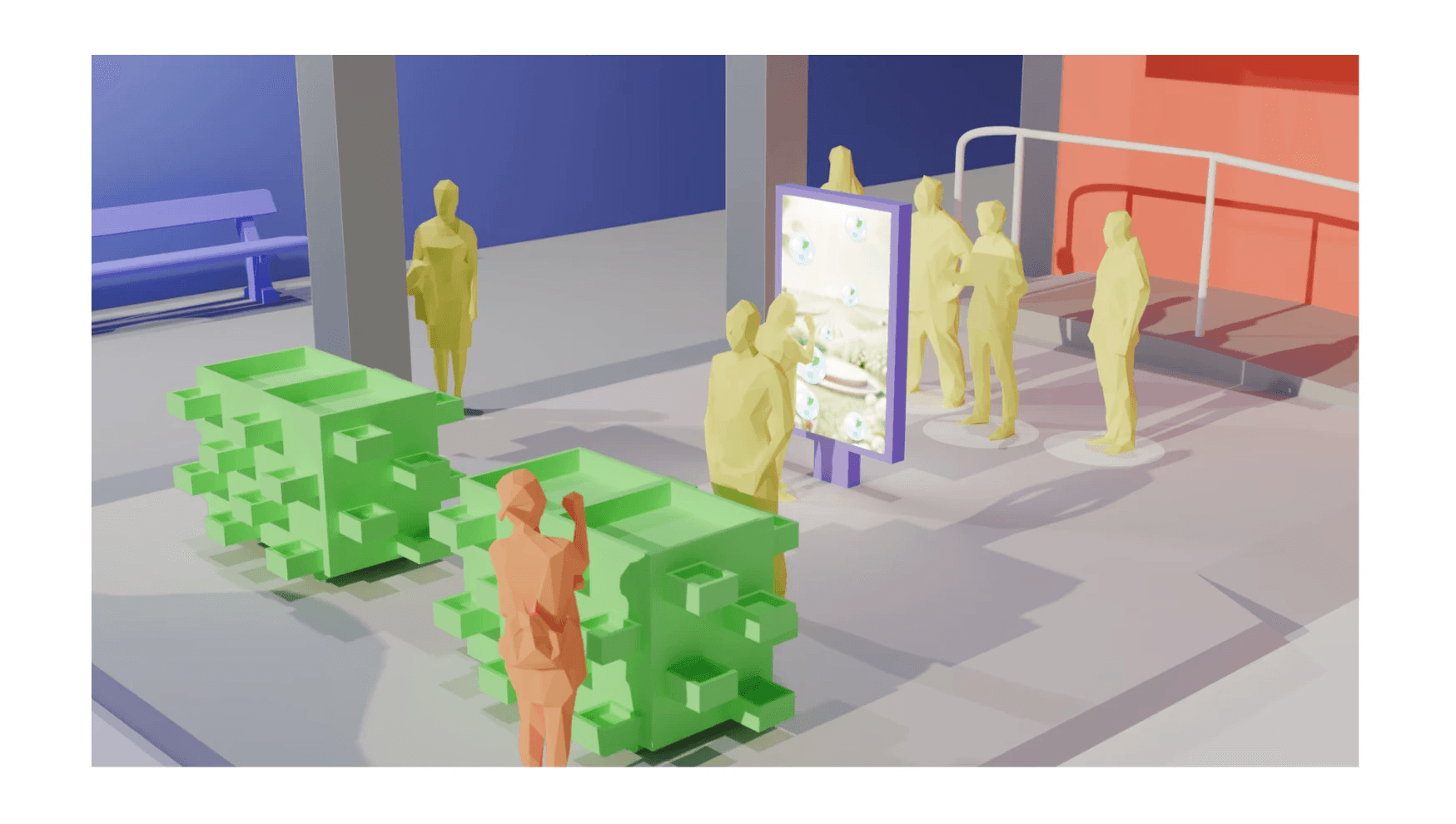
Portable vegetable station near the digital board
3D Mock-up of Space
Live On-Site Workshop
Process - Pot Customisation
During the workshop:
Participants receive a free pot to customise (name/paint/sticker)
Start growing their own vegetable
End of the workshop:
On-site staff select the best customised pot
Winner receives a local voucher - cafes/restaurants, bookshop, pet stock etc.
Staff execute the safety plan to protect the vegetables during unstaffed hours
The workshop:
After virtual customisation, participants customise a real pot
On-site staff to host workshop sessions
Live On-Site Workshop
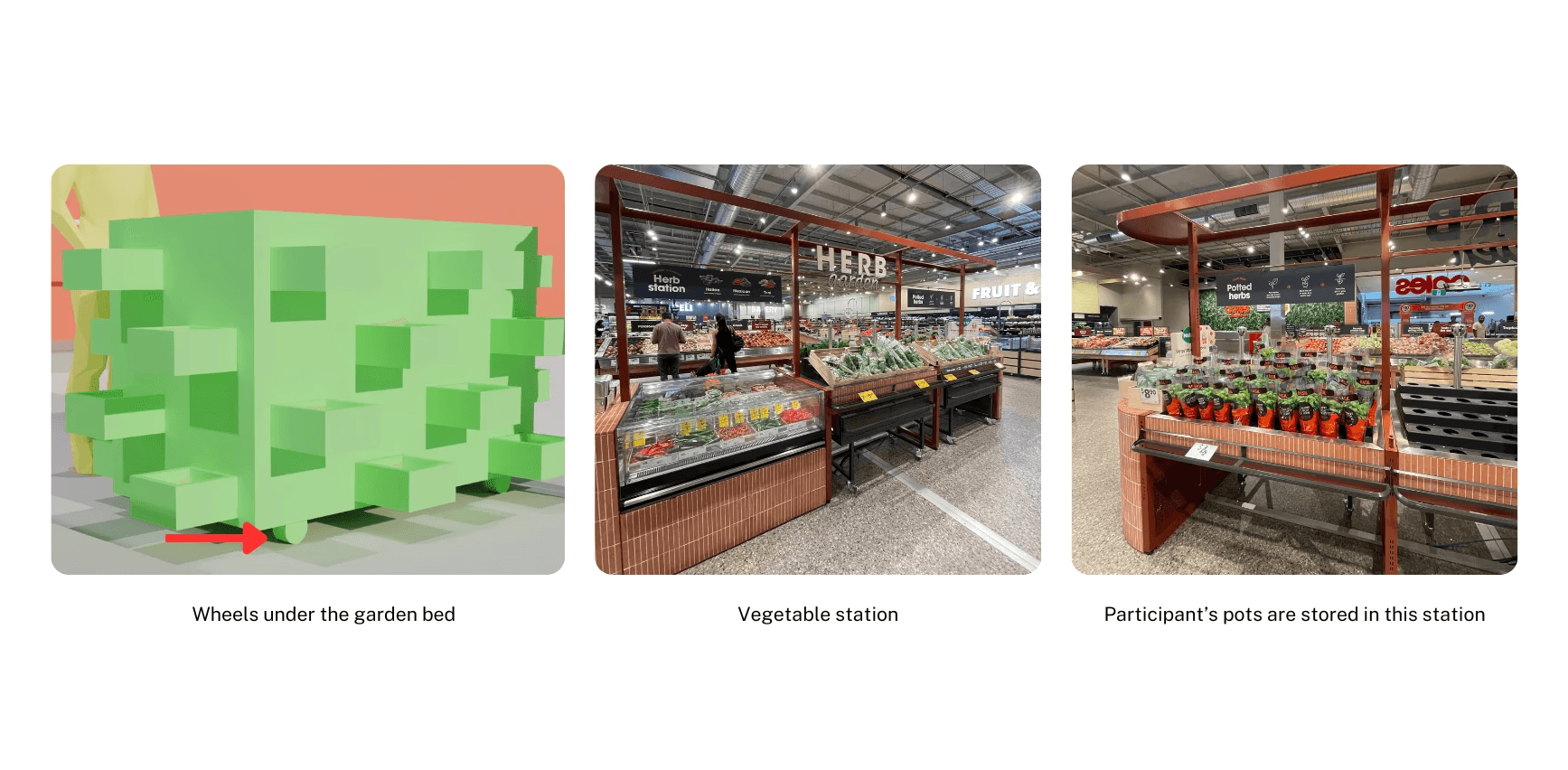
Security Considerations
Safety Plan:
The garden is wheeled into Coles after the final session
Store in the designated section: 'vegetable station' (similar to photo)
Live On-Site Workshop
Portable vegetable station near the digital board
3D Mock-up of Space
Live On-Site Workshop
Process - Pot Customisation
During the workshop:
Participants receive a free pot to customise (name/paint/sticker)
Start growing their own vegetable
End of the workshop:
On-site staff select the best customised pot
Winner receives a local voucher - cafes/restaurants, bookshop, pet stock etc.
Staff execute the safety plan to protect the vegetables during unstaffed hours
The workshop:
After virtual customisation, participants customise a real pot
On-site staff to host workshop sessions
Live On-Site Workshop
Security Considerations
Safety Plan:
The garden is wheeled into Coles after the final session
Store in the designated section: 'vegetable station' (similar to photo)
Live On-Site Workshop
Portable vegetable station near the digital board
3D Mock-up of Space
Live On-Site Workshop
Process - Pot Customisation
During the workshop:
Participants receive a free pot to customise (name/paint/sticker)
Start growing their own vegetable
End of the workshop:
On-site staff select the best customised pot
Winner receives a local voucher - cafes/restaurants, bookshop, pet stock etc.
Staff execute the safety plan to protect the vegetables during unstaffed hours
The workshop:
After virtual customisation, participants customise a real pot
On-site staff to host workshop sessions
Live On-Site Workshop
Security Considerations
Safety Plan:
The garden is wheeled into Coles after the final session
Store in the designated section: 'vegetable station' (similar to photo)
Live On-Site Workshop
Portable vegetable station near the digital board
3D Mock-up of Space
Live On-Site Workshop
Process - Pot Customisation
During the workshop:
Participants receive a free pot to customise (name/paint/sticker)
Start growing their own vegetable
End of the workshop:
On-site staff select the best customised pot
Winner receives a local voucher - cafes/restaurants, bookshop, pet stock etc.
Staff execute the safety plan to protect the vegetables during unstaffed hours
The workshop:
After virtual customisation, participants customise a real pot
On-site staff to host workshop sessions
Live On-Site Workshop
Security Considerations
Safety Plan:
The garden is wheeled into Coles after the final session
Store in the designated section: 'vegetable station' (similar to photo)
Live On-Site Workshop
3D Mock-up of Space
Portable vegetable station near the digital board
Live On-Site Workshop
Process - Pot Customisation
During the workshop:
Participants receive a free pot to customise (name/paint/sticker)
Start growing their own vegetable
End of the workshop:
On-site staff select the best customised pot
Winner receives a local voucher - cafes/restaurants, bookshop, pet stock etc.
Staff execute the safety plan to protect the vegetables during unstaffed hours
The workshop:
After virtual customisation, participants customise a real pot
On-site staff to host the workshop sessions
Live On-Site Workshop
Security Considerations
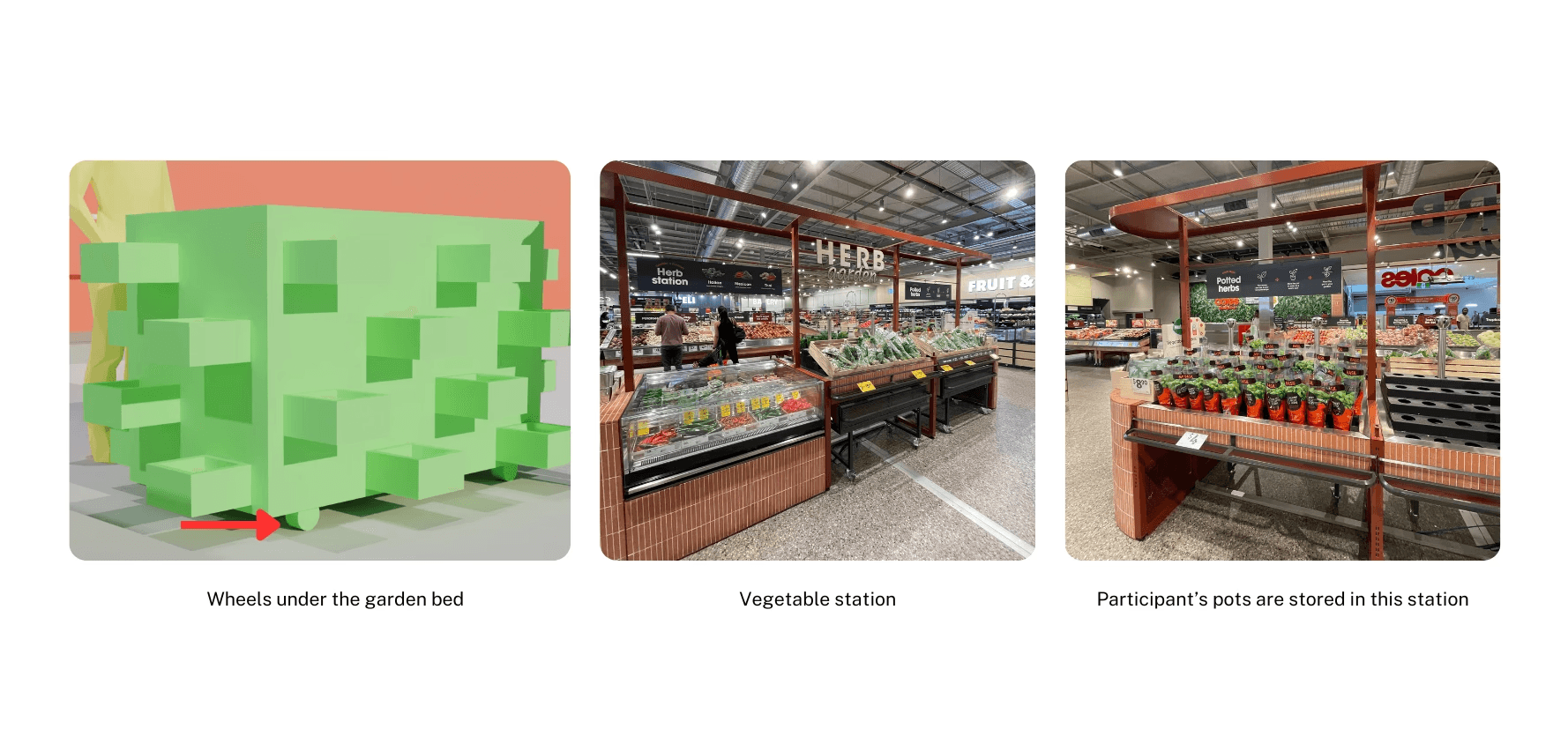
Safety Plan:
The garden is wheeled into Coles after the final session
Store in designated section: 'vegetable station'
Live On-Site Workshop
3D Mock-up of Space
Portable vegetable station near the digital board
Live On-Site Workshop
Process - Pot Customisation
During the workshop:
Participants receive a free pot to customise (name/paint/sticker)
Start growing their own vegetable
End of the workshop:
On-site staff select the best customised pot
Winner receives a local voucher - cafes/restaurants, bookshop, pet stock etc.
Staff execute the safety plan to protect the vegetables during unstaffed hours
The workshop:
After virtual customisation, participants customise a real pot
On-site staff to host the workshop sessions
Live On-Site Workshop
Security Considerations
Safety Plan:
The garden is wheeled into Coles after the final session
Store in designated section: 'vegetable station'
Live On-Site Workshop
3D Mock-up of Space
Portable vegetable station near the digital board
Live On-Site Workshop
Process - Pot Customisation
During the workshop:
Participants receive a free pot to customise (name/paint/sticker)
Start growing their own vegetable
End of the workshop:
On-site staff select the best customised pot
Winner receives a local voucher - cafes/restaurants, bookshop, pet stock etc.
Staff execute the safety plan to protect the vegetables during unstaffed hours
The workshop:
After virtual customisation, participants customise a real pot
On-site staff to host the workshop sessions
Live On-Site Workshop
Security Considerations
Safety Plan:
The garden is wheeled into Coles after the final session
Store in designated section: 'vegetable station'
Live On-Site Workshop
3D Mock-up of Space
Portable vegetable station near the digital board
Live On-Site Workshop
Process - Pot Customisation
During the workshop:
Participants receive a free pot to customise (name/paint/sticker)
Start growing their own vegetable
End of the workshop:
On-site staff select the best customised pot
Winner receives a local voucher - cafes/restaurants, bookshop, pet stock etc.
Staff execute the safety plan to protect the vegetables during unstaffed hours
The workshop:
After virtual customisation, participants customise a real pot
On-site staff to host the workshop sessions
Live On-Site Workshop
Security Considerations
Safety Plan:
The garden is wheeled into Coles after the final session
Store in designated section: 'vegetable station'
Action Hub:
Prototype Experience
Action Hub:
Prototype Experience
The bubble screen sparks curiosity and invites interaction. In the real world, users would engage through touch, which is represented by the mouse input in the prototype.
The bubble screen sparks curiosity and invites interaction. In the real world, users would engage through touch, which is represented by the mouse input in the prototype.
CUSTOMISE SCREEN
Virtual pot customisation
BAKE SCREEN
Virtual baking
CUSTOMISE SCREEN
Virtual pot customisation
BAKE SCREEN
Virtual baking
CUSTOMISE SCREEN
Virtual pot customisation
BAKE SCREEN
Virtual baking
CUSTOMISE SCREEN
Virtual pot customisation
BAKE SCREEN
Virtual baking
CUSTOMISE SCREEN
Virtual pot customisation
BAKE SCREEN
Virtual baking
CUSTOMISE SCREEN
Virtual pot customisation
BAKE SCREEN
Virtual baking
CUSTOMISE SCREEN
Virtual pot customisation
BAKE SCREEN
Virtual baking
CUSTOMISE SCREEN
Virtual pot customisation
BAKE SCREEN
Virtual baking
Stage 04 :
Reflection
Stage 04 :
Reflection
I reflected on the project as a whole, recognising how each team member’s contributions and participants' feedback came together to shape a cohesive final solution.
I reflected on the project as a whole, recognising how each team member’s contributions and participants' feedback came together to shape a cohesive final solution.
The project began with ambiguity, as digital placemaking was a broad and unfamiliar domain. Through site visits, interviews, and observations, my team and I worked to clearly define the problem, while navigating the challenge of integrating physical space with digital interaction for the first time.
Through ongoing team discussions, tutor consultations, and participant feedback, the concept evolved from “adopting” a vegetable to “customising” a vegetable pot, creating a stronger narrative flow that naturally extended into “baking” with the vegetable. This shift significantly improved user understanding, engagement, and overall satisfaction.
Overall, this project was both a new challenge and a personal breakthrough, as I led the team through the design and prototype development while taking ownership of the 'Action Hub' and workshop.
The project began with ambiguity, as digital placemaking was a broad and unfamiliar domain. Through site visits, interviews, and observations, my team and I worked to clearly define the problem, while navigating the challenge of integrating physical space with digital interaction for the first time.
Through ongoing team discussions, tutor consultations, and participant feedback, the concept evolved from “adopting” a vegetable to “customising” a vegetable pot, creating a stronger narrative flow that naturally extended into “baking” with the vegetable. This shift significantly improved user understanding, engagement, and overall satisfaction.
Overall, this project was both a new challenge and a personal breakthrough, as I led the team through the design and prototype development while taking ownership of the 'Action Hub' and workshop.